Day 45 — I have Linux and macOS wheels!
Today I continued my quest of packaging my Python C extension for multiple OSes. Yesterday while doing a packaging "test run" with the curses "hello world" program, I found that curses is not supported on Windows (it should work with WSL, but not with the "default" Windows terminal I guess).
So the first thing I wanted to ensure today was that poppler and some of its dependencies that I need (freetype, fontconfig, libpng, and libjpeg) are supported on Windows. Ilia had suggested that I could use cygwin to do Linux-y things on Windows, so I borrowed my mom's laptop which runs Windows 7, and installed poppler and its dependencies; along with git, gcc/g++, make and cmake:
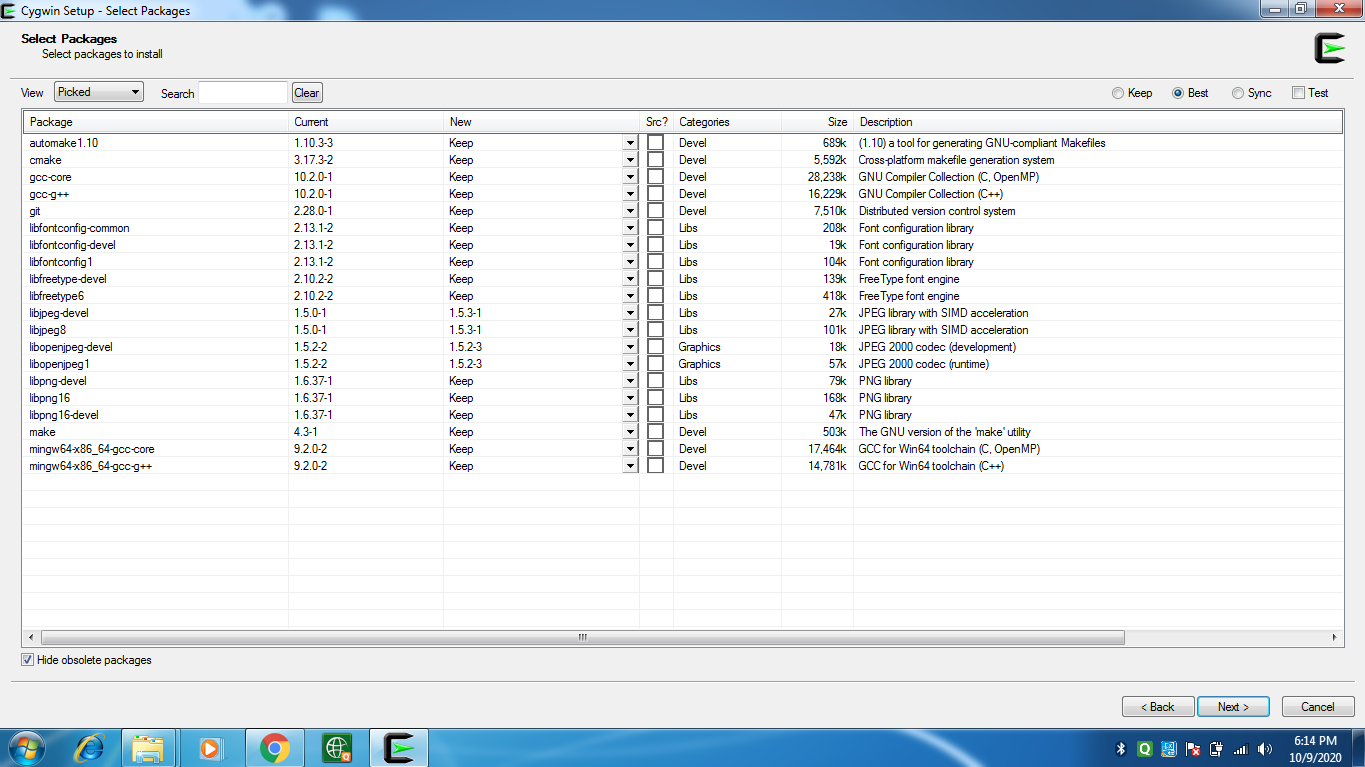
I was able to clone and build poppler from source! It still required the jpeg library to generate the Makefiles, even though I set ENABLE_LIBOPENJPEG=none. I'll have to debug that at some point so that I can remove this poppler dependency.
  > cmake -D ENABLE_QT5=OFF -D ENABLE_LIBOPENJPEG=none -D ENABLE_CPP=OFF ..
  > make poppler
After the test, I wanted to transfer some files from the Windows laptop to my laptop using python -m http.server, but didn't know what the Windows equivalent of ifconfig was (to get the Windows laptop's IP address that I could access on my laptop), and also didn't want to spend time finding and installing ifconfig on cygwin. I found this nice alternative!
  >>> import socket
  >>> s = socket.socket(socket.AF_INET, socket.SOCK_DGRAM)
  >>> s.connect(("8.8.8.8", 80))
  >>> print(s.getsockname()[0])
  '192.168.1.4'
And after that, I went back to building wheels for Linux and macOS, and started setting up the packaging pipeline (from yesterday) for poppler-utils. The only changes I had to make to the setup.py were:
- Include all of the
popplerandpybind11header files:
  ext_includes = [
      "lib/poppler",
      "lib/poppler/fofi",
      "lib/poppler/goo",
      "lib/poppler/poppler",
      "lib/poppler/build",
      "lib/poppler/build/poppler",
      "lib/poppler/utils",
      "lib/poppler/build/utils",
      pybind11.get_include(),
  ]
- Declare the module name, and pass in the path to the
C++source:
  ext_modules = [
      Extension(
          "poppler_utils.pdftopng",
          # Sort input source files to ensure bit-for-bit reproducible builds
          # (https://github.com/pybind/python_example/pull/53)
          sorted(["src/poppler_utils/pdftopng.cpp"]),
          include_dirs=ext_includes,
          language="c++",
      ),
  ]
When I installed the package using pip, it called setuptools (which internally uses distutils, I think) to build the extension using g++, and link it to the relevant shared libraries using ld:
$ pip install -v -e .
I also had to make changes to the cibuildwheel GitHub workflow:
- Add bash scripts for Linux and macOS to install external dependencies and build
poppler. The Linux build script looks like this, and the macOS one is similar:
  #!/bin/bash

  brew install freetype fontconfig libpng jpeg

  cd lib/poppler
  mkdir build && cd build
  cmake -D ENABLE_QT5=OFF -D ENABLE_LIBOPENJPEG=none -D ENABLE_CPP=OFF ..
  make poppler
- Add the
popplerbuild directory toLD_LIBRARY_PATHbefore calling theauditwheelrepair command, because otherwise the build would fail saying that auditwheel wasn't able to locate thepopplershared library. And correspondingly,DYLD_LIBRARY_PATHfordelocateon macOS.
  CIBW_REPAIR_WHEEL_COMMAND_LINUX: "LD_LIBRARY_PATH=$(pwd)/lib/poppler/build/:$LD_LIBRARY_PATH auditwheel repair -w {dest_dir} {wheel}"
  CIBW_REPAIR_WHEEL_COMMAND_MACOS: "DYLD_LIBRARY_PATH=$(pwd)/lib/poppler/build:$DYLD_LIBRARY_PATH delocate-listdeps {wheel} && delocate-wheel -w {dest_dir} -v {wheel}"
There was also this bug I faced where delocate wasn't copying all required shared libraries into the built wheel on macOS (fastmac helped me debug again!) because it doesn't look at top-level extension modules. After searching for a fix in the open issues, I found it in this PR!
And after renaming the extension from pdftopng to poppler_utils.pdftopng (and making it "not a top-level" module), delocate started copying all the required shared libraries into the wheel!
I finally have Linux and macOS wheels! Now I just need to figure out the Windows ones.
I also looked at Windows wheels for some existing projects (numpy and arrow) to see all the libraries they bundle. Both of those wheels have pyd files, which were new to me. I learned that a pyd file is the same as a dll file on Windows, but with some Python-specific things in it.
If you have a DLL named
foo.pyd, then it must have a functionPyInit_foo(). You can then write Python "import foo", and Python will search forfoo.pyd(as well asfoo.py,foo.pyc) and if it finds it, will attempt to callPyInit_foo()to initialize it.
- The Windows wheel for
numpycontains only onedll(BLAS) with a lot ofpyd,pyx(Cython files to be converted to C/C++),pxd(Cython equivalent of a C/C++ header), andcfiles!
  $ unzip -l numpy-1.19.2-cp38-cp38-win_amd64.whl | grep dll
   32939993  2020-09-10 01:30   numpy/.libs/libopenblas.NOIJJG62EMASZI6NYURL6JBKM4EVBGM7.gfortran-win_amd64.dll
- The Windows wheel for
arrowcontains multipledlls! (Along with all the other types of files mentioned above)
  $ unzip -l pyarrow-1.0.1-cp38-cp38-win_amd64.whl | grep dll
    8459264  2020-08-17 19:35   pyarrow/arrow.dll
     910336  2020-08-17 19:35   pyarrow/arrow_dataset.dll
    2610176  2020-08-17 19:35   pyarrow/arrow_flight.dll
    1264640  2020-08-17 19:35   pyarrow/arrow_python.dll
      91648  2020-08-17 19:35   pyarrow/arrow_python_flight.dll
      81920  2020-08-17 19:35   pyarrow/cares.dll
    3249664  2020-08-17 19:35   pyarrow/libcrypto-1_1-x64.dll
    2661888  2020-08-17 19:35   pyarrow/libprotobuf.dll
     651264  2020-08-17 19:35   pyarrow/libssl-1_1-x64.dll
    2204672  2020-08-17 19:35   pyarrow/parquet.dll
      89600  2020-08-17 19:35   pyarrow/zlib.dll
I also did a mock interview (which was really helpful!) with Vaibhav (who is super awesome!). And I also paired with Ilia to look at his C++ & WebAssembly project. We implemented rendering a multi-line string in a canvas inside the browser using C++! Pointers are fun! I need to learn how to write pointer code fluently like Ilia.
Since half of the second half of my batch is over (only 3 weeks left now!), I did a "things" check-in. I haven't included the things I dropped in the check-in I did at the batch midpoint:
Remove ghostscript and opencv as camelot dependencies to make installation easy for users- Almost done here. I wasn't able to "remove" the dependencies, but I think I got to an acceptable solution. Will put this in the background now.- Learn Rust and WebAssembly - I wanted to do this to help with 1, but it finally didn't lead to anything as I ended up going the Python C extension route. But I'm excited to get into these because I'm bamboozled by the fact that I can write something in a low-level language like Rust (which has an awesome ecosystem of tools), and have it run in my browser!
- Make new open-source tools! - I've worked on present, itslit, opep, python-doc, python-peps-graph, and pdftopng. I have more ideas but not sure if I'll be able to work on them.
Go deep into operating systems, learn how Linux and containers work, andimplement a shell! - Dropping the first half but planning to implement a shell using C and/or Rust!- Write blog posts about anything! (1 per week) - This is happening! I'll continue doing this.
- Prepare for job interviews - Might not need this in the near term.
I've condensed these down to the following:
- Write more Rust and C. Work on a large-ish project. Implement a snek game, a shell,
...! - (Background processes) Continue packaging the extension, and work on OSS issues.
- Continue writing 1 blog post for each day.